Find the AWS savings your dashboard hides
Your personal cloud cost expert — always available, in any language. Ask questions in natural language, get live data with dynamic charts, and receive tailored optimization opportunities.
Talk with the service through your AI chat interface (ChatGPT or Claude) in English, or in another language your LLM supports.
Typical finding: "Your RDS instance is costing $2,400/month. Aurora Serverless could cut that to $600."
RDS is often the top quick win — most teams overpay for databases they could right-size or migrate to serverless.
No credit card. No data stored or sold. Takes 30 seconds.
Your Path to Cloud Savings
Expert AWS cost optimization delivered through natural conversation. You always have an expert to talk to, and you can always get a detailed progress report and personalized savings opportunities.
Step 1: Improve Visibility
Intelligent API calls surface your cost breakdown with dynamic charts. Boost cost allocation with tag coverage analysis, treemap visualizations, and IaC-specific remediation plans.
Step 2: Optimize Consistently
Tailored recommendations for your specific accounts -- idle resources, rightsizing, commitment plans, and serverless migration paths. Each opportunity ranked by savings potential and ease of implementation.
Step 3: Sustain Efficiency
Anomaly detection with conversational explanations, budget guardrail assessments, and ongoing cost health scoring. Stay optimized as your workloads evolve.
Natural Language, Any Language
Ask questions in English, French, Spanish, Arabic, German, Italian, or any language your LLM supports. Get fresh data and relevant recommendations -- no forms, no cryptic filters.
Rich Interactive Charts
Dynamic Sankey diagrams, treemaps, cost timelines, pie charts, and weekly glyphs render inline. Follow up with questions and get tailored suggestions in real time.
Your Expert, Always Available
A detailed progress report and personal saving opportunities whenever you need them. From zero to hero as the cost optimization champion of your company.
Beyond the Quick Win
The first savings are just the beginning. Cost Coach provides ongoing monitoring and optimization so your cloud spend stays efficient as your workloads evolve.
Monthly Savings Reports
Track your spend trends over time. See exactly how much you saved this month compared to last, with clear before-and-after breakdowns.
New Recommendation Alerts
Cost Coach keeps scanning your account for new optimization opportunities. When prices change or usage patterns shift, you get fresh recommendations automatically.
Budget Guardrail Monitoring
Set spending thresholds and get conversational alerts when you approach them. No more surprise bills at the end of the month.
Optimization Score Tracking
Watch your Cost Health Score improve as you implement recommendations. A gamified 0-100 score covering tag coverage, serverless adoption, and guardrail compliance.
See It in Action
Cost Coach works inside your AI chat interface (ChatGPT or Claude) -- right where you already work.
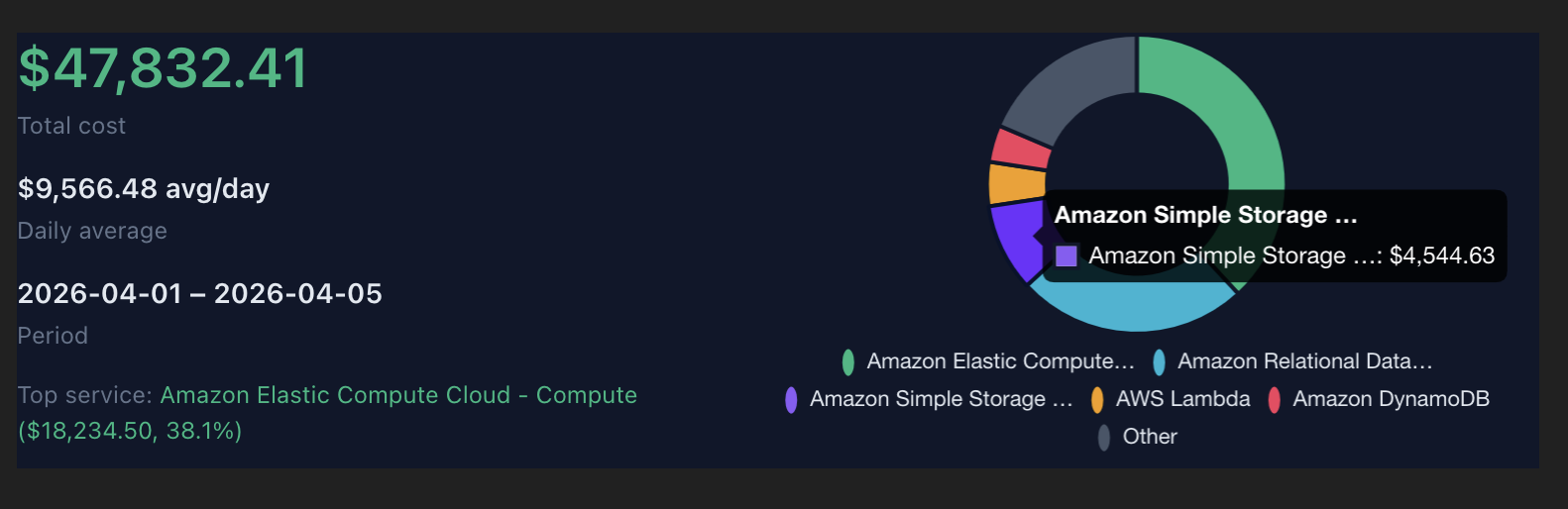
Cost breakdown by service
See your AWS spend at a glance -- $47K broken down by EC2, RDS, S3, Lambda, and more with daily averages
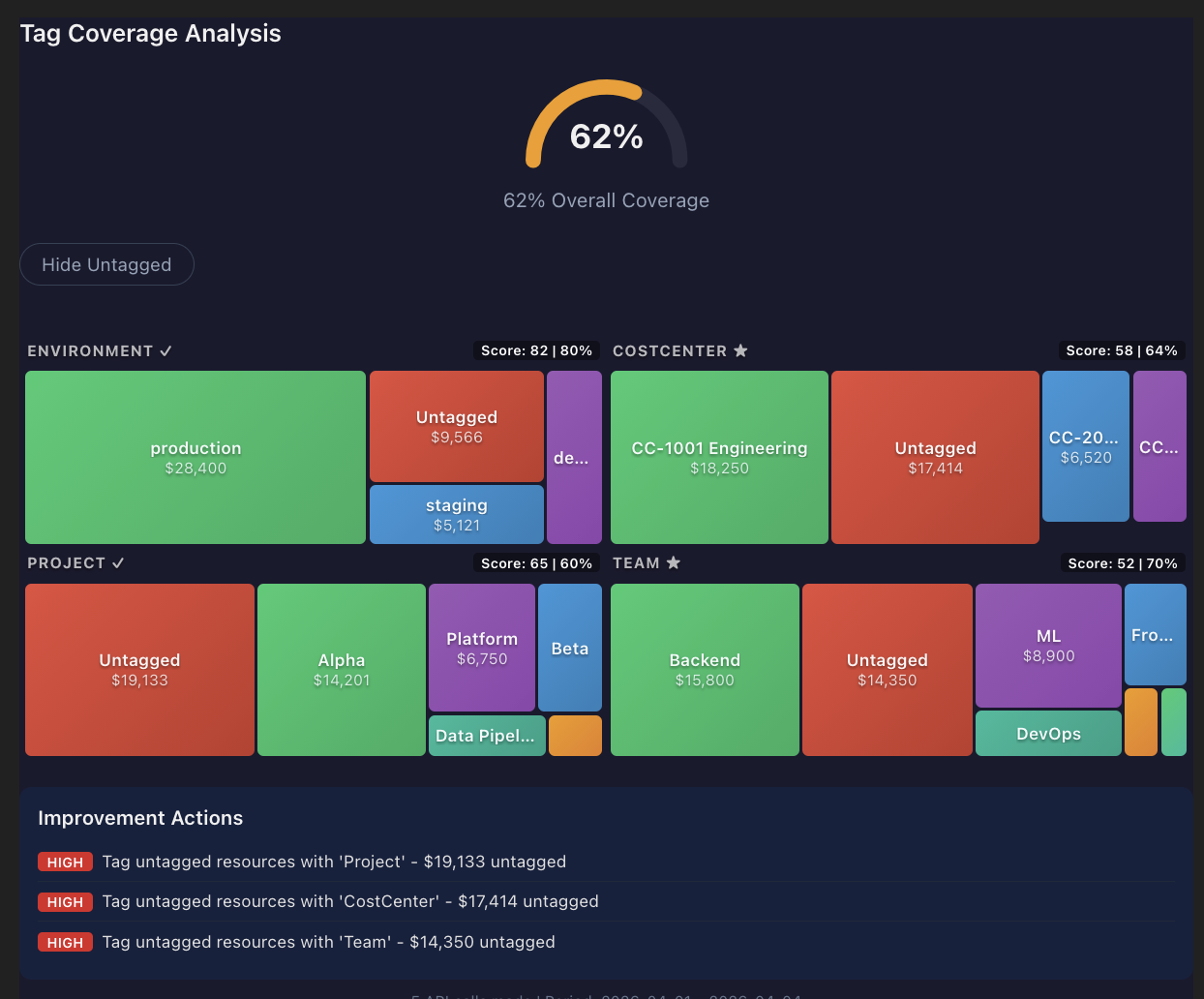
Tag coverage treemap
Visualize tag coverage across services with scores, untagged spend, and prioritized improvement actions
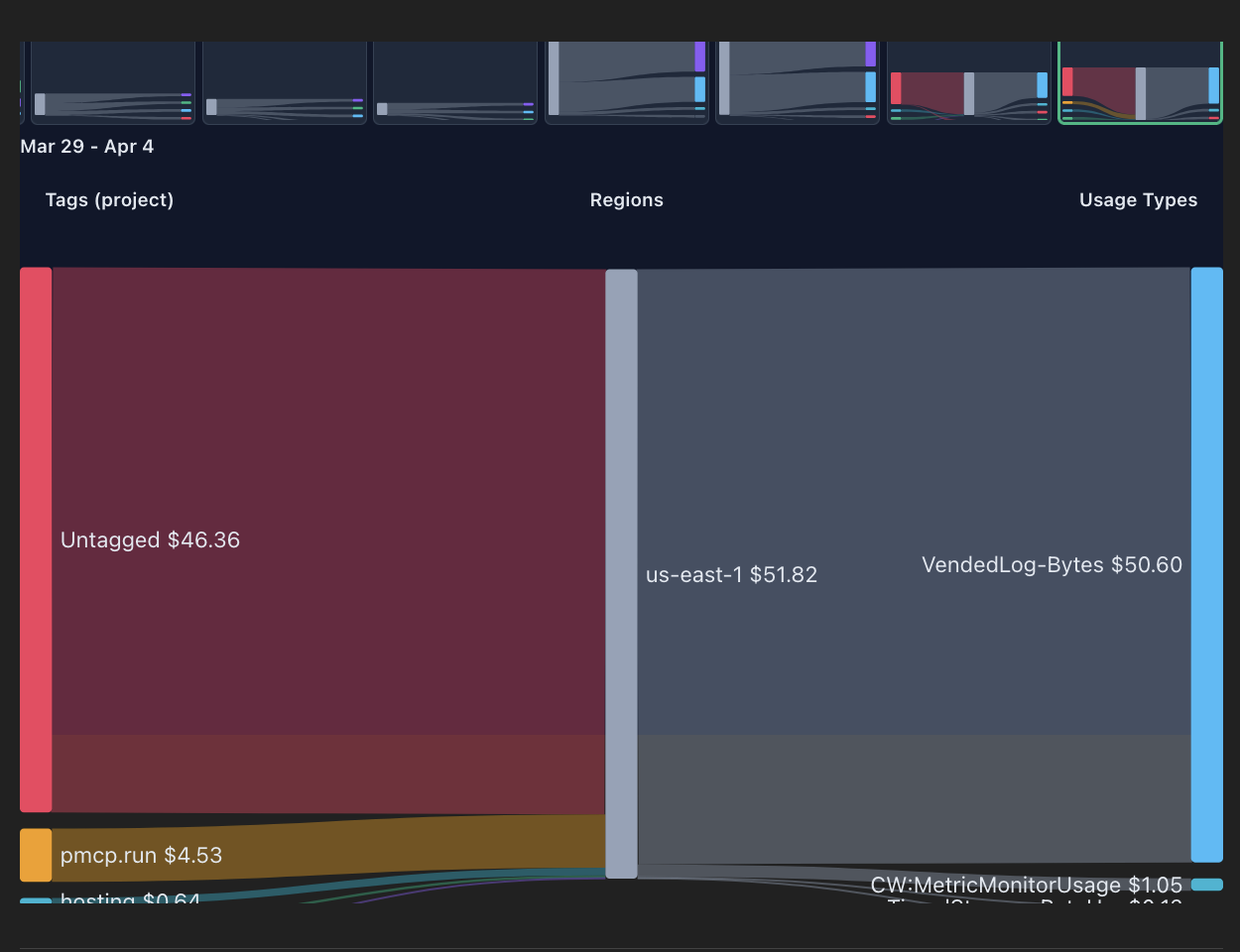
Sankey cost flow diagram
See where your money flows from tags through regions to usage types -- spot untagged spend instantly
Transparent Pricing
We only win when you save. Our pricing is aligned with your success.
of monitored AWS spend
of realized savings
Start with a 7-day free trial. No credit card required.
Estimate Your Cost
Install in Claude Desktop
The fastest way to try Cost Coach. Claude Desktop installs it as a custom connector; OAuth sign-in runs in a browser popup on first connection.
Open Connectors
Go to claude.ai/customize/connectors in your browser while signed in to Claude.
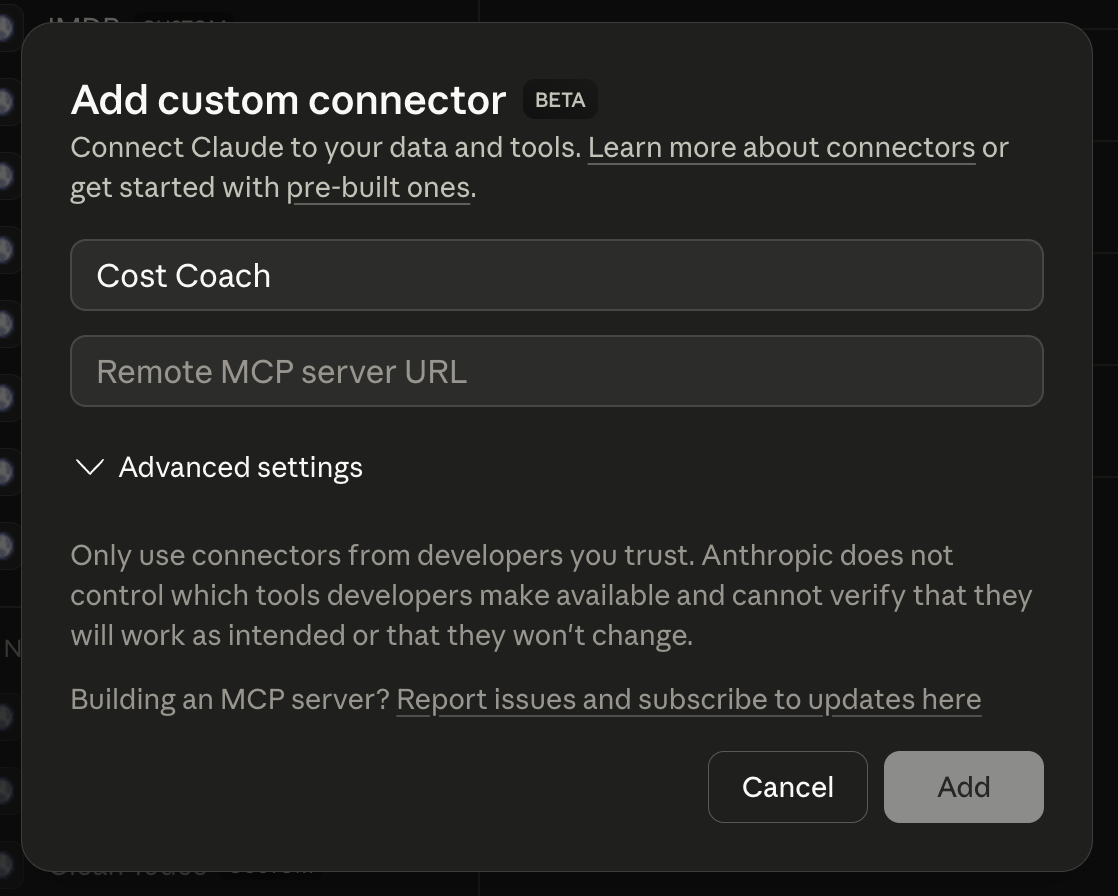
Add custom connector
Click the + in the Connectors column and choose "Add custom connector" from the menu.
Name it and paste the URL
Name the connector "Cost Coach" and paste the server URL below into the Remote MCP server URL field, then click Add.
Sign in and start
Sign in with your Cost Coach account when prompted, then ask 'Where can I save money on my AWS bill?'
Remote MCP server URL
https://cost-coach.us-west.pmcp.run/mcp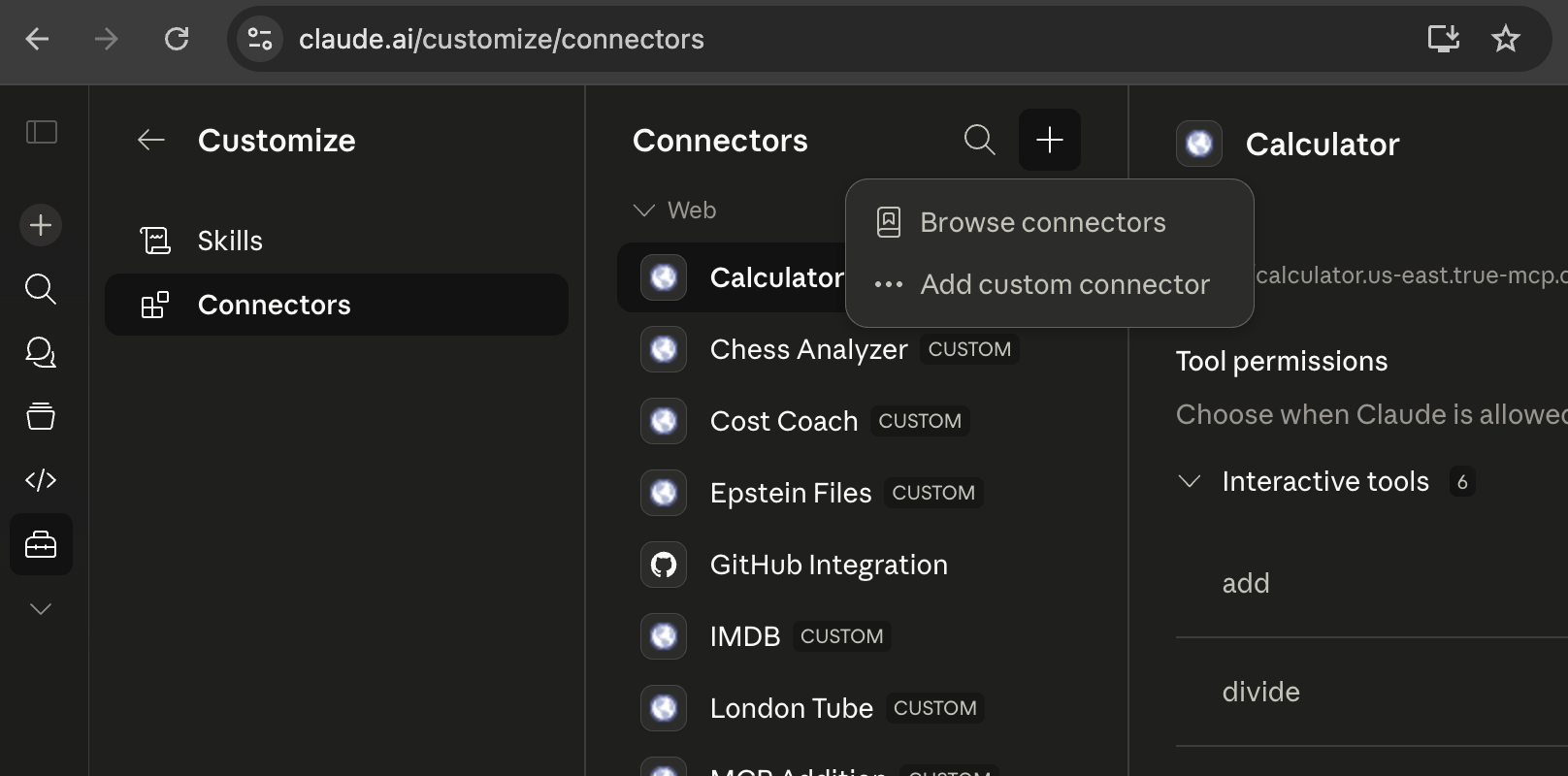
Install in ChatGPT
Cost Coach runs inside ChatGPT as a custom connector. Developer Mode is required while OpenAI's app store stabilizes — once enabled, installation takes under a minute.
Open Connector Settings
Go to chatgpt.com/gpts/mine → Settings → Connectors, open Advanced Settings, and enable Developer Mode.
Create app
Click "Create app" to add a new connector. ChatGPT will ask for a name and a remote MCP server URL.
Enter Cost Coach details
Name: Cost Coach. Paste the server URL shown below into the Remote MCP server URL field, then Save.
Sign in and start
Sign in with your Cost Coach account when prompted, then ask 'Where can I save money on my AWS bill?'
Remote MCP server URL
https://cost-coach.us-west.pmcp.run/mcpOther MCP Clients
Connect Cost Coach from Claude Code, Cursor, or any MCP-compatible client.
Generic MCP Client
Any MCP-compatible client can connect using the streamable HTTP transport described in the MCP spec.
- 1Follow the MCP spec guide for connecting to a remote server.
- 2Use the server URL below when your client prompts for a remote endpoint.
https://cost-coach.us-west.pmcp.run/mcpHow does it work?
Two steps to a live cost conversation.
Step 1 — Connect Your AWS Account
Grant read-only access to your billing data with a single CloudFormation stack. No credentials stored.
Deploy Stack
Download the CloudFormation template and deploy it in your AWS account. It creates a read-only IAM role with minimal billing permissions.
Copy Role ARN
After the stack completes, copy the Role ARN from the Outputs tab in CloudFormation.
Start Optimizing
Open Cost Coach in ChatGPT or Claude. It connects automatically and runs your first cost analysis.
Read-only access only
The IAM role grants read-only access scoped to four areas: cost & billing (ce:Get*, budgets:Describe*), account inventory (organizations:List*, tag:Get*), resource describes (ec2:Describe*, rds:Describe*, elasticache:Describe*, redshift:Describe*, elasticloadbalancing:Describe*, s3:ListAllMyBuckets), and utilization metrics (cloudwatch:GetMetricStatistics, cloudwatch:ListMetrics). No resources can be created, modified, or deleted. An ExternalId condition prevents confused-deputy attacks.
Step 2 — Start Talking
Ask anything about your AWS costs in natural language. Here are some ways to get started.
“Show me my AWS costs for March”
Breaks down your monthly spend by service, region, and account with trend comparisons to identify where costs are growing.
“Where is my money going?”
Generates an interactive Sankey diagram showing cost flow from total spend through services, regions, and tags -- making allocation intuitive.
“How are my tags?”
Analyzes tag coverage across all services with specific improvement steps. Shows which resources are untagged and why it matters for cost allocation.
“What can I save on EC2?”
Identifies over-provisioned instances and recommends right-sizing or serverless migration paths with projected monthly savings.
“Forecast my end-of-month spend”
Predicts end-of-month spend with confidence intervals. Compares forecasts against budgets to catch overruns before they happen.
“Any cost anomalies this week?”
Surfaces unexpected cost spikes with plain-language explanations of what changed and why, helping you catch runaway spend quickly.